Frequently Asked Questions
1. Getting started & general questions
- One location: Give 24/7 access to what they need, when they need it.
- Instant adaptability: Change an asset once; it’s live for everyone, everywhere.
- Efficient handovers: Eliminate the back-and-forth on every new request.
- Built to scale: Support 5 clients or 50 from one organised dashboard.
- Branded experience: Create an individual brand environment for every client.
- Permission-based access: Keep all data secure by controlling exactly what each user can see.
Our platform is specially designed for a wide range of users, including:
- Marketing and brand teams: Streamline collaboration, manage brand assets and ensure brand consistency across all channels.
- Brand designers and agencies: Build guideline templates in your workspace and transfer them to your clients.
- Other departments: HR, sales, customer service and product development can access the brand narrative and assets to align team onboarding and maintain a unified brand experience.
- Start-ups: Establish a strong brand identity from the beginning and easily manage it as your business grows.
- Established companies: Keep all brand assets and guidelines in one place, improve team collaboration across departments and ensure brand consistency at scale.
Brandguide is the single source that combines your vision, all your assets, examples of best practices, templates and directions for use in an interactive, visual and dynamic live platform. Like storage platforms we support the use of folders. In addition, information is shared via pages and you can build a DAM with collections, labels, tags and custom fields so searching for information goes beyond name and file type.
Yes, it is a web-based, living brand platform that supports dynamic media like audio and video. Rich media support embeds, including live Figma boards.
Our credo is: Easy to make. Simple to manage!
Setup is virtually instant.
Creating a workspace, building the folder structure, filling pages and collections with content and managing assets all happens in the front-end. In real time.
Importing files is as simple as drag and drop.
So you could be up and running in a matter of hours.
The main variable is your internal strategy, specifically:
- Structuring your guidelines workspace
- Deciding on taxonomy (naming and labeling conventions)
Need help? We offer custom onboarding and design services to get you launch-ready immediately.
2. Pricing & support
Yes. Of course you can!
Owners can go to the dashboard and up-/downgrade their plan in Workspace/Plan & Billing.
Alternatively, send us a message with your requirements regarding your Brandguide subscription through the contact form or by email at support@brandguide.com.
You can cancel your subscription at any time with 1 month notice.
Once you give notice, your account will stay active and you can continue using Brandguide for 30 days. After this period, your subscription will end and you will not be charged again.
To cancel, send us a message through the contact form or email support@brandguide.com.
Brandguide is free for unlimited view-only guests. You pay for active team members and storage.
Starter plan: Starts at €149/month
- Includes 2 admins, 10 users, and 25GB of storage.
Add-ons & extras:
- Additional admin/editor: €59 / seat / month
- Domain login (Company Domain): €99 / month
- SSO integration: €99 / month
- Extra storage: €10 / 10GB / month
We provide end-to-end support to keep your workspace running smoothly:
- Onboarding & training: Tailored onboarding sessions and editor training are available to get your team confident and up to speed fast.
- Customer support: Our support team guarantees a response to your inquiries within 24 business hours.
- Content updates: Need help maintaining your workspace? We offer hands-on content update services for €75 / hour.
- Feedback & Feature Requests: We actively build for our users. So client feedback and feature suggestions are always welcome.
3. Features & file management
As many as you need. There are no limits.
Brandguide accepts any file type for storage and renders all standard browser-supported media formats natively.
We support iframes to embed live, published web content and interactive tools like Figma, Vimeo or interactive documents - directly within your pages.
We believe brand guidelines should reflect the brand itself. With Brandguide, every element is completely customisable: from colours and fonts to page layouts and structure.
4. Search & discovery
- Optional AI auto-tagging: Uploaded images are automatically tagged to improve searchability and surface visually similar assets. This feature can be toggled on or off at any time in your DAM settings.
- Custom metadata & filtering: Filter assets instantly using custom fields, labels, colour codes, expiry dates and usage rights.
- Smart asset grouping: Search results use asset tags to automatically group and suggest visually similar media.
NOTE: We do not extract text from documents.
5. File conversions & delivery
No, we do not offer auto file conversion.
Yes, Brandguide includes a built-in global CDN, ensuring fast global file loading, smooth video streaming and reliable asset delivery everywhere.
6. Compliance & version control
Updating an asset inside Brandguide instantly refreshes it everywhere it’s used, saving you the hassle of manual re-linking or accidentally overlooking outdated files.
Use labels and custom fields to set asset statuses (e.g., Draft, Approved, Archived) across multiple files at once, avoiding the need to edit them one by one.
This feature is currently in active development, with a planned release for late 2026.
7. Users & access permissions & security
Admins can easily invite new editors and users directly through their own Brandguide dashboard.
For company-wide access, you can enable Single Sign-On (SSO) user provisioning. This automatically grants access to your entire organisation without the need to send individual invites.
As many as you like! There is no limit.
You can share your brand guidelines and asset libraries with as many internal team members, external partners or agency clients as needed.
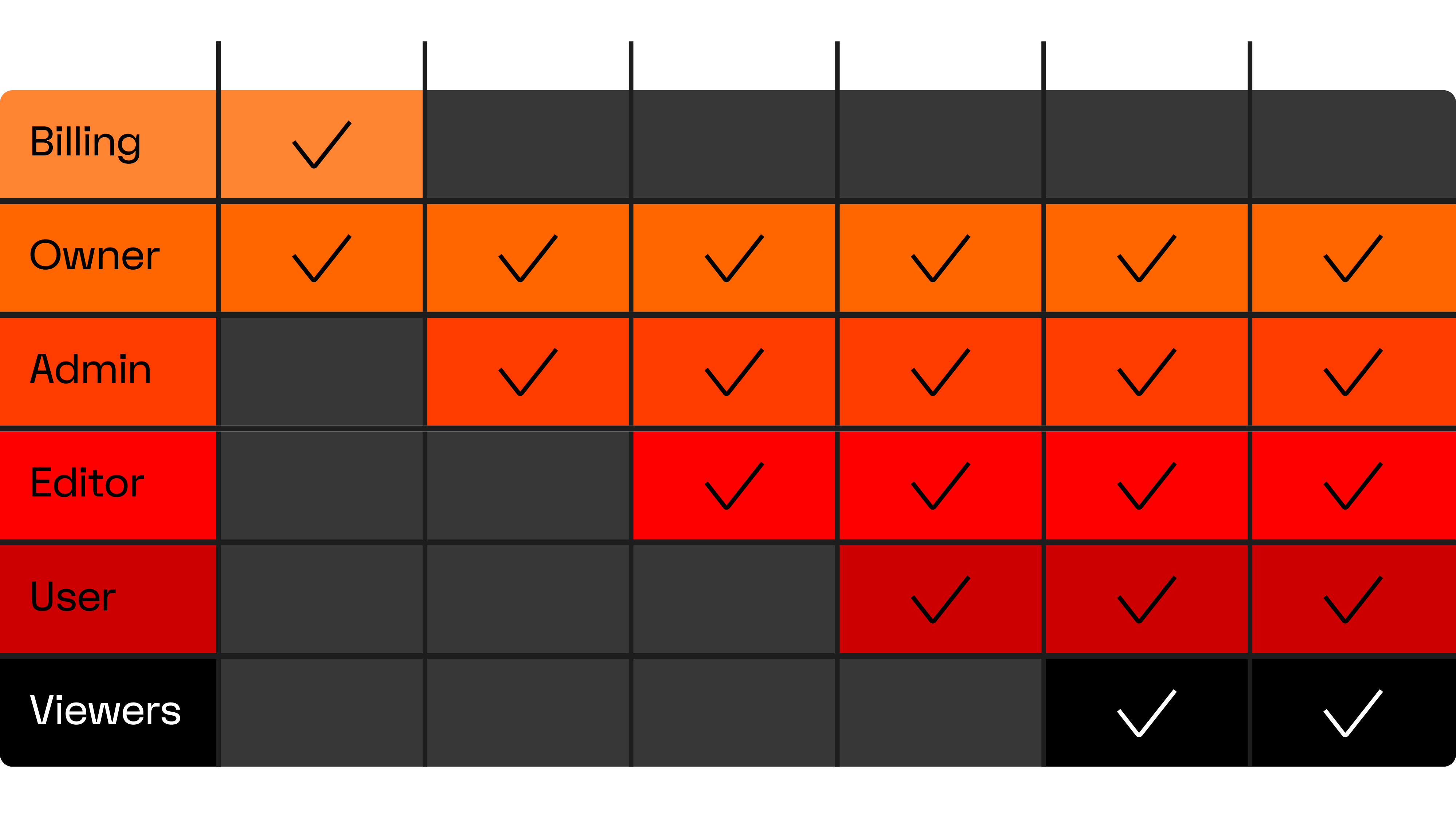
Brandguide gives you granular control over who can view, edit or download specific assets:
- Role-based access: Assign predefined roles such as admins (full system control), editors (content creation and file management) and users (share, download and view access).
- Workspace & Collection Permissions: Restrict or grant access to specific folders, asset collections or confidential brand pages based on team, department or client status.
- Custom Download Rights: Control who can download high-resolution master files versus web-ready previews, or set approval workflows for restricted media.
This ensures external agencies and internal departments see only what they need, keeping your core brand assets secure and compliant.
There are three ways to share files with external partners:
- Invite them as view-only guests: Unlimited free access for browsing and downloading approved assets.
- Send a secure file transfer: Deliver assets instantly using direct, optional passwordless download links without requiring account creation.
- Add partners as a user to Brandguide for easier access: Has similar rights as a view-only guest, with the permission to share.
8. Security, SSO & integrations
Yes, you can add expiry dates and custom fields regarding licensing to any file.
Yes, via Microsoft, Okta and Google.
All communication between users and Brandguide is safeguarded by SSL encryption, as it occurs over HTTPS. This encryption also applies to all media in flight uploaded by users.
All data in rest is also encrypted.
SSL encryption, SOC 2 compliance and regional data storage (e.g. GDPR compliance).
Do you have more security questions?
Email us at info@brandguide.com and we will be happy to help.